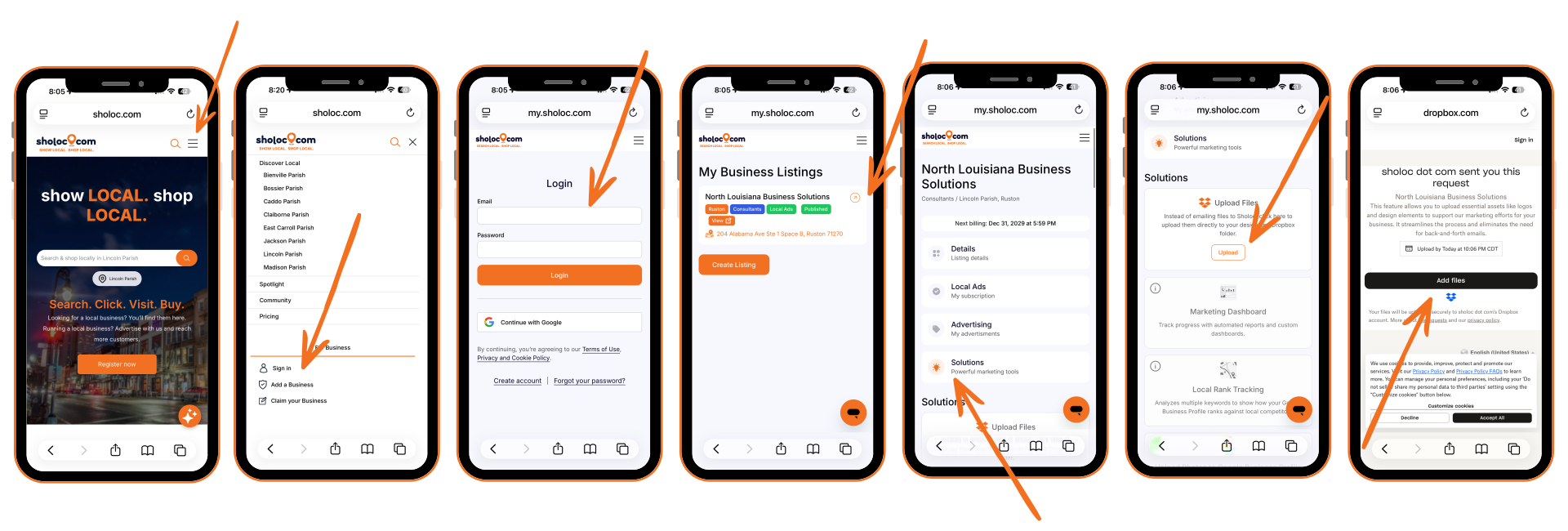
Here’s how to upload images or files to your my.sholoc.com account, along with the photo checklist below.
Required photo types for a complete, optimized business listing
Capture photos from every direction customers may approach, and include shots at different times of day to give a complete view of your business.
Capture photos that show what it feels like to stand inside your business as a customer, highlighting the atmosphere and experience.
Showcase your most popular items with clear, evenly lit photos that highlight your products.
Capture photos of your team delivering various services, including any specialty offerings that set your business apart.
Upload clear, high-quality 1500×1500 images of every item on your menu. Each photo should accurately represent the dish, be well-lit, and use a white background.
Showcase your most popular menu items with clear, evenly lit lifestyle photos that capture the food in a real, appetizing setting.
Add at least one photo of each common area (like the spa, gym, or breakfast room), capturing the atmosphere and experience of each space.
Showcase all the different room types you offer, capturing photos that show what it's like to experience each room as a customer.
Include some casual but professional photos featuring you and your staff, highlighting your personalities and helping potential customers get a feel for your business.
Adding videos to your Google Business Profile helps attract and engage potential customers by showcasing your business in action. Videos can highlight your storefront, services, or customer experience, making your profile more dynamic and trustworthy.